How to Time a Feature Announcement So Every Channel Reinforces the Last
Arcade's 2026 roundup of feature announcement examples scores launches against a rubric that puts more weight on time-to-asset than on anything else, twenty-five percent of the total, and its judgment on assets that arrive late is blunt: If the video ships more than 24 hours after GA, momentum is gone. The finding is about video, but the underlying mechanic applies to every surface you own. A changelog entry published three days after the release, an email that lands the following week, an in-product banner that appears once the early adopters have already found the feature on their own: each of those is a channel doing its work in isolation instead of building on the one before it.
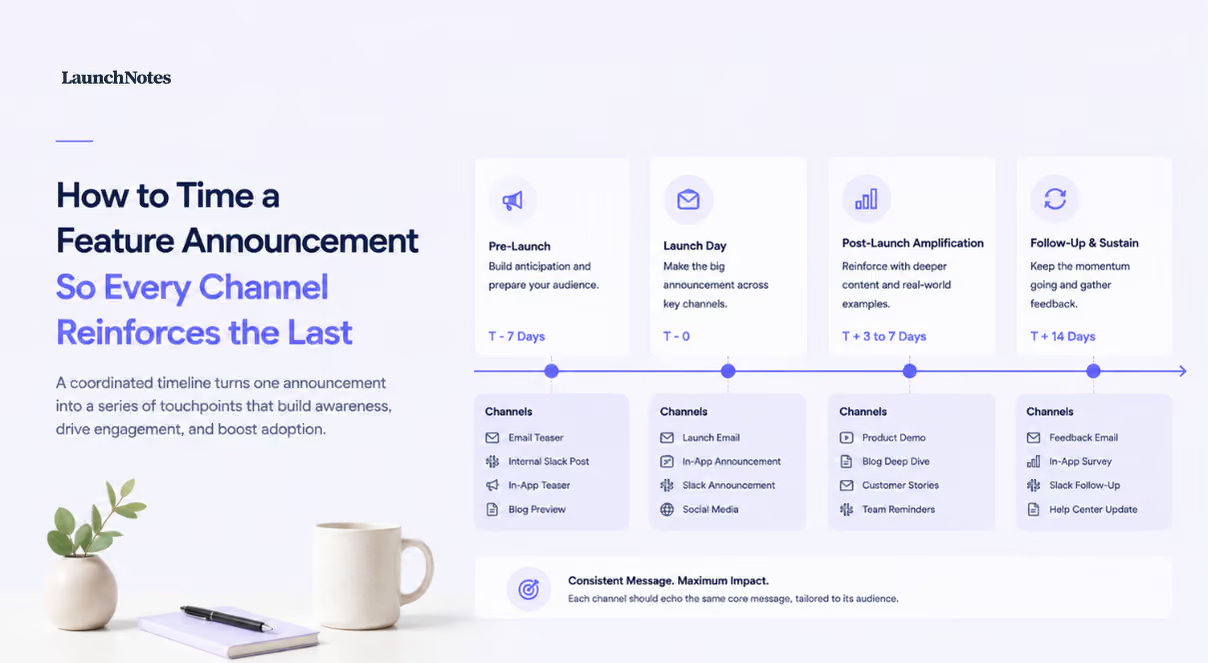
Timing, in other words, is not the administrative tail end of a launch. It is the part of the plan that decides whether a customer encounters your feature announcement four times as four separate interruptions or once as a coherent message that gets reinforced wherever they happen to look next. The sequence below is the one we would run for a release of consequence, with the ordering, the ownership, and the conditions that tell you a step is actually finished.
What a Well-Timed Feature Announcement Produces
When every channel fires at once, a single customer can open the app to a modal, find the same copy in their inbox, and see a third version of it on the changelog inside a few minutes, and none of those arrivals makes the others more persuasive. Sequencing changes the relationship between them. The internal briefing means support recognizes the feature before the first ticket arrives, the changelog entry gives the email something live to link to, and the in-product message lands on someone who has already seen the name once and now has the feature in front of them. Reinforcement is the goal, and redundancy is what you get by default.
Two decisions have to be made before any of it sends. The first is who receives the announcement, which means the eligible segment is defined in advance and users on plans that do not include the feature are left out of the send rather than filtered out after the complaints start. The 2026 guide on announcing product updates reduces the whole discipline to a single instruction, Announce less, route smarter, and routing is precisely what the segment definition does. The second decision is internal: support, customer success, and sales know what shipped before any public channel fires, because a customer-facing team hearing about a feature from a customer is a failure of sequencing rather than of knowledge. Boldare's guidance on announcing new features also puts measurement inside the launch rather than after it, watching how users react on social and surveying early adopters, which only works if you know which users you targeted in the first place.
Tier the Feature Before You Build the Sequence
Not every release earns the full sequence, and running one for a copy change is how teams train their customers to ignore product communications entirely. Three inputs decide the tier. Breadth of user impact tells you how much of the base is affected. Magnitude of workflow change tells you whether someone has to learn something new or will simply notice that an old friction is gone. Plan availability tells you how narrow the audience actually is, which matters more than most teams admit, since announcing a feature to accounts that cannot access it produces support ticket volume rather than adoption, and the tickets arrive from exactly the customers you were hoping to impress.
A minor improvement needs a changelog entry and, if there is a natural moment to point it out, a contextual tooltip at the place in the interface where the change shows up. Nothing else. The guide on announcing product updates draws the same line between formats, reserving modals for major updates and tooltips for contextual ones, and the format choice follows the tier rather than the enthusiasm of the person who built the feature.
A major release, meaning one that changes how a core workflow is done or opens capability that customers have been asking for, gets the whole sequence: the internal briefing, the changelog entry, the segmented email, the in-product message, and a demo asset that someone can watch or click through instead of reading. Assign the tier in writing, at the same time you set the GA date, because the tier is what tells everyone which assets they owe and when.
Prepare the Three Core Assets Before GA
Three pieces of copy need to exist before the release goes live, and they are not three drafts of the same paragraph. Draft the changelog entry first and treat it as the canonical record, the version that carries the full detail: what changed, why, what it requires, what it does not yet do. Every other asset then references that entry instead of restating it, which keeps the email short and keeps you from maintaining four descriptions of one feature in four places. LaunchNotes centralizes release notes, roadmaps, and feature updates for that reason, so the canonical version has one home rather than living in whichever tool a given team opened first.
The email is structurally different. It leads with the outcome the customer gets and hands off to the changelog for the specifics, following the same instinct the 2026 announcement guide applies in-app when it argues for leading with user impact rather than the feature name. The in-product copy is shorter still, usually a sentence and a destination. Arcade's rubric rewards a distribution surface that spans landing page, changelog, social, email, and sales, along with freshness signals like a version tag and a dated changelog entry, and none of that is achievable if the assets are still in review when engineering flips the flag. Assets that miss GA do not merely arrive late; they push the announcement outside the window when customers were paying attention to the release at all.
The Order of Operations Across Channels
The sequence runs internal briefing, changelog, email, in-product message, and each step has a condition that has to hold before the next one starts. The most common ordering mistake is letting the in-product message go live before the email, which means an active user gets hit twice inside one session and reads the second version as noise. Set a suppression rule so a user who has already received one form of the announcement does not receive another in the same session, then work through the four steps in order.
Step 1: Brief Internal Teams
The briefing is short and covers four things: the customer outcome in one sentence, the segment receiving the announcement, the plans the feature is available on, and the limitations you already know about. Support and customer success need all four, since the limitations are what generate the first wave of questions. Sales gets the briefing when the feature has prospect-facing relevance, which is a real filter rather than a courtesy, because a pipeline team that receives every release update stops reading them. The step is done when the teams have confirmed receipt, not when the message was posted.
Step 2: Publish the Changelog Entry
Publish the entry at GA so that the link in the email resolves the moment the email sends, and give the entry the fields that make it useful six months later: the feature name, the outcome in customer language, the access requirement, and a version tag with a date. A changelog earns its keep when customers return to it on their own rather than only reading it when pushed, which is what Arcade observed at Notion, where the changelog is described as the primary surface driving repeat feature adoption across a base that has crossed 100 million users. Treat the entry as a live communication surface and the announcement keeps working after the email has been archived.
Step 3: Send the Announcement Email
The email sends the same day the changelog goes live, to the eligible segment only, with the ineligible plans suppressed rather than trusted to self-select. Write the subject line around what the customer can now do instead of the label your team gave the feature, because internal names carry no meaning in an inbox. Email is also the only channel in the sequence that reaches people who are not currently logged in, which makes it the channel that matters most for lapsed accounts and for the stakeholders who care about the product without using it daily. Keep the body to the outcome, one line on who it applies to, and the link to the entry.
Step 4: Activate In-Product Messaging
In-product format is a UX cost decision. A major update that changes a core workflow justifies a modal, since interrupting is the point when someone is about to encounter a screen that has moved. A contextual addition that requires no immediate action belongs in a banner or a hotspot; the roundup of nine ways to launch features recommends hotspots specifically as subtle discovery triggers, and the same roundup points out that the login page is the highest-traffic page you own, which makes it a reasonable place for a tier-one announcement to appear once. Modals used on every release stop being read at all, and users learn to dismiss them without registering the copy, so keep a persistent What's New badge available for the customers who prefer to find changes themselves. Whatever format you choose, lead with the impact rather than the feature name, and set the suppression rule so the message respects what the customer has already seen.
When the Sequence Breaks and How to Recover
Three failures account for most broken sequences, and each has a defined response. If the changelog entry is not ready at GA, hold the email one business day rather than sending it with a link that resolves to nothing, since a dead link costs more trust than a day of delay. If the segment turns out to be too broad and includes accounts on plans without the feature, suppress both the email and the in-product message for those users immediately and let the changelog carry the news; the customers who were briefly confused will forgive a quiet correction faster than a follow-up apology email. If internal teams were not briefed before the announcement went out, send the briefing now with an explicit note that inbound questions have already started, and give support a holding response they can use accurately while they read it. Recovery in each case follows the same instinct that governs the sequence itself: narrow the audience, keep the canonical entry accurate, and let the internal teams catch up before you push further.
Reaching Prospects and Leads Outside the Product
In-product channels only reach people who are already customers, and a feature that resolves a known objection is worth more to the pipeline than to the base. The public path runs through the changelog and a What's New page that anyone can read without an account, plus a subscription option for the people who want the updates pushed to them. LaunchNotes supports announcements, roadmaps, customer feedback, integrations, webhooks, GraphQL, RSS, and security features depending on plan, so the public surface can feed the channels prospects already use rather than requiring a separate publishing motion. Public surfaces carry real weight at scale, which is why Arcade's rubric counts sales enablement as part of distribution alongside landing pages and social, and why Vercel, with over a million developers on the platform, treats its public release surfaces as a growth channel rather than documentation. Publish the prospect-facing material at the same time as the customer announcement, not after the user sequence has finished, so a sales rep referencing the feature on a call that afternoon has something live to send.
Measuring Whether the Sequence Worked
Four measurements tell you whether the ordering earned its complexity. Adoption rate among eligible users inside a defined window, seven or fourteen days depending on how often your customers log in, is the headline number. Channel comparison, meaning which channel preceded each user's first activation event, tells you whether the email or the in-product message did the work, and it is the number that should change next quarter's sequence. Support ticket volume tied to the feature tells you whether the copy explained the change or created questions. Qualitative signal completes the picture, and Boldare recommends both watching how users react on social and surveying early adopters directly; keep that survey to a single question, since the seven in-app announcement examples make the practical point that response rates rise when there is only one thing to answer. Routing matters here too, in the way FitnessPlayer sent anyone scoring zero to six on its one-question NPS modal straight into a cancellation survey rather than thanking them and moving on. Read the four together, then adjust the sequence for the next announcement of the same tier.
The Done State for a Feature Announcement
A feature announcement is finished when four conditions hold: the changelog entry is live and accurate, the email has gone to the correct segment, the in-product message is active with its suppression rule in place, and the internal teams have confirmed they received the briefing. Add a fifth if the feature was visible on a public roadmap during development, because the roadmap entry needs to move to shipped as part of closing out the launch rather than weeks later when someone notices. Once those conditions are confirmed, the announcement hands off to measurement, and the numbers from that window become the input for how you sequence the next release of the same tier. If you want to see what that looks like running on one platform, book a demo and bring a release you have already shipped.